Lead generation
Why are my Meta lead ads bringing in bad leads?
Usually because the campaign is paid to collect forms, and nothing tells Meta which forms became customers. Meta then finds the people most likely to submit, and the easier the form, the more of them never meant to buy. In one audited account, leads cost C$2.63 each, 46% reached a first call and 0.7% converted.
What is a bad lead?
A bad lead is a submitted form that was never going to become a customer. You paid for it, your team spent time on it, and it went nowhere.
Bad leads come in four kinds:
- The accidental one. The person tapped twice and did not mean to send anything.
- The wrong fit. They are interested, but they are not eligible or cannot afford what you sell.
- The unreachable one. The phone number or email is old, mistyped or never answered.
- The forgetful one. By the time you call, they do not remember filling in a form.
Two terms matter for the rest of this post. Cost per lead is your ad spend divided by the number of forms you received. A qualified lead is a lead your team has checked and can sell to. Meta reports the first number. Only your own records can give you the second.
Why does Meta send you leads that never buy?
Because Meta delivers what the campaign asks for, and a standard lead campaign asks for submitted forms.
An instant form opens inside Facebook or Instagram with the person's contact details already filled in. Meta's help center describes the default type this way:
"More volume (default): Makes it easy for people to quickly submit the form on a mobile device, as this option is designed to generate a larger number of leads."
So the default form is the easiest one to send, and the campaign is rewarded for every send. The reasoning from there is ours, not Meta's: if nothing comes back to Meta about what happened after the form, a person who taps and forgets counts exactly the same as a person who becomes a customer. Meta cannot tell them apart, so it cannot look for more of the second kind.
What did one real account find?
The account we audited sold a service and ran two kinds of lead campaign over six months. Both were Meta campaigns, and together they spent about C$40,000.
| Instant form | Website assessment | |
|---|---|---|
| Spend | C$18,835.79 | C$20,980.80 |
| Leads | 7,157 | 4,379 |
| Cost per lead | C$2.63 | C$4.79 |
| Asked before sending | 1 yes-or-no question | 13 answers over 3 steps |
| Form type | More volume | Not an instant form |
On cost per lead, the instant form won easily. Then we read what the company's CRM, Salesforce, sent back to Meta about the form's leads. A CRM is the system where a sales team records each lead and how far it got.
| Stage in the CRM | Leads | Share of form leads | Cost for each |
|---|---|---|---|
| Lead created | 6,678 | 93.3% | C$2.82 |
| First call | 3,294 | 46.0% | C$5.72 |
| Marked unqualified | 902 | 12.6% | C$20.88 |
| Converted | 49 | 0.7% | C$384.40 |
Fewer than half of the form's leads reached a first call. A converted lead cost C$384.40, which is 146 times the cost of a lead.
The owner's target was C$5 per qualified lead. A first call alone already cost C$5.72. And the company had not yet defined "qualified" in its CRM, so nobody could say whether either campaign hit the target.
The website assessment could not be judged at all. The CRM sent stages back to Meta for form leads only, so there was no record of how the website's leads turned out. The audit could not say that the dearer leads were better. It could only say that nobody knew.
Why do leads get worse when you spend more?
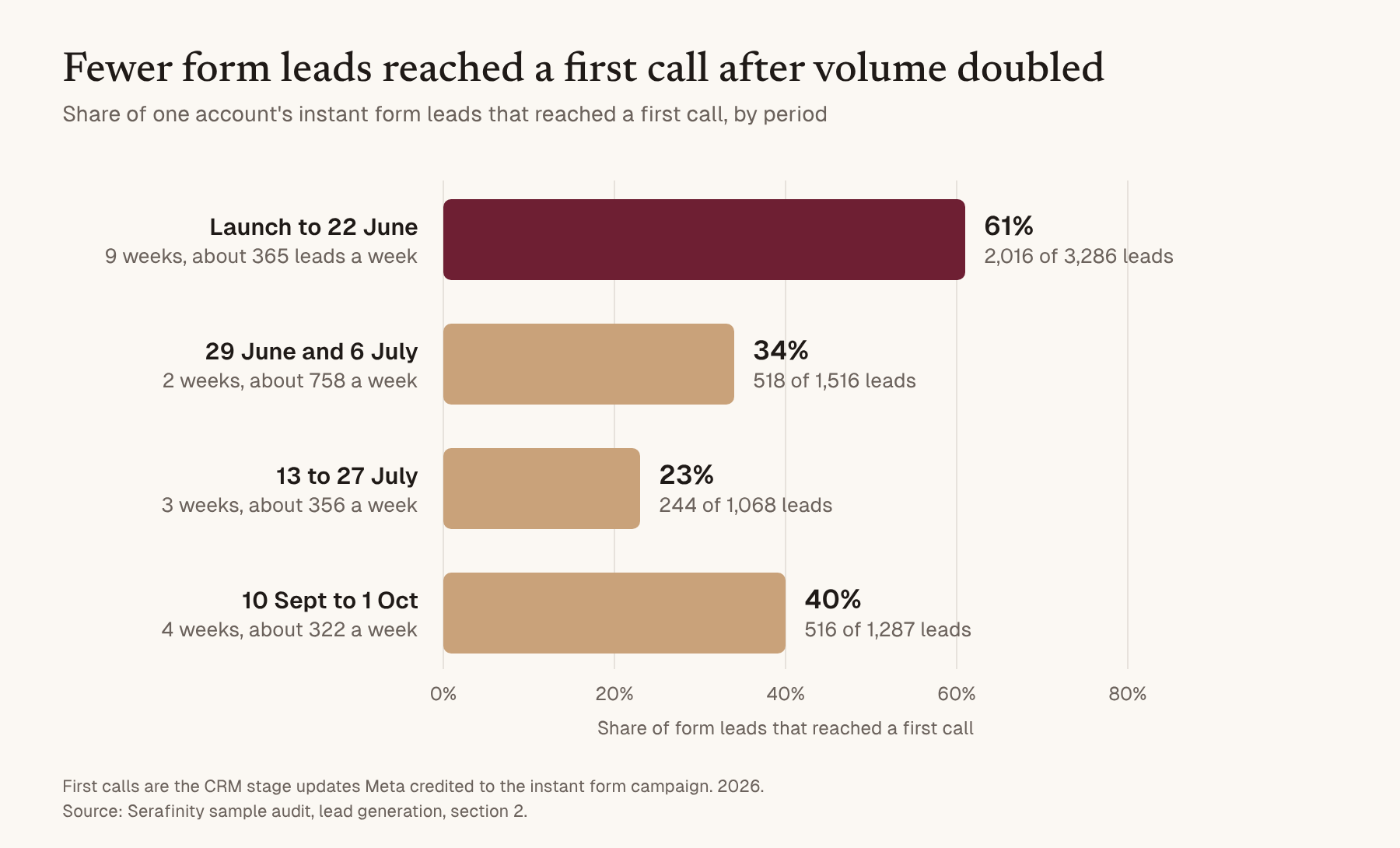
In this account, the share of form leads that reached a first call dropped when weekly volume doubled, and it stayed low after volume came back down. The cost of each extra lead rose with daily spend.
| Period | Form leads | Leads a week | First calls | Share |
|---|---|---|---|---|
| Launch to 22 June (9 weeks) | 3,286 | about 365 | 2,016 | 61% |
| 29 June and 6 July (2 weeks) | 1,516 | about 758 | 518 | 34% |
| 13 July to the pause on 27 July (3 weeks) | 1,068 | about 356 | 244 | 23% |
| Restart, 10 September to 1 October (4 weeks) | 1,287 | about 322 | 516 | 40% |
The leads-a-week column is our division of the audit's figures.
The cost side moved the same way. Between C$100 and C$200 of spend a day, each extra lead cost C$2.42. Above C$200 a day, each extra lead cost C$4.06.
Weekly volume doubled at the end of June, and the first-call share almost halved. Volume then fell back to its launch level, and the share kept falling. Two things can cause this, and the audit could not separate them. The first is your team. Meta's own best-practice page warns that "receiving thousands of leads in a short time can overwhelm your sales team or call centers." A lead nobody calls for three days is a worse lead than the same person called the same afternoon. The second is the audience. The more leads you buy each day, the further Meta has to go past the people most likely to respond.
Either way, the average cost per lead hid it. The same pattern shows up in stores, where the extra spend earns less than the average.
How do you check your own lead quality?
You need your CRM or lead spreadsheet and about 15 minutes.
- Export the last 90 days of leads with two columns: where each lead came from (which campaign or form) and the furthest stage it reached.
- For each source, count four things: leads, leads your team reached, leads that qualified, and leads that became customers.
- Divide each source's ad spend by its qualified leads. That is your cost per qualified lead, and it is the number to judge a campaign on.
- Do the same by month. A falling share of reached or qualified leads is the early sign that volume has outrun your team or your audience.
- Open the instant form attached to your ad and note its form type and how many questions it asks before the person can send it.
If your records cannot tell you where a lead came from, that is the first thing to fix. In the audited account, it was the first of five recommended changes.
How do you fix bad leads from Meta lead ads?
Fix the form, tell Meta what happened to each lead, and match volume to your team.
| Fix | What it changes | What it costs you |
|---|---|---|
| Switch the form type to Higher intent | Adds a review screen before sending | Fewer forms, and delivery on mobile feeds only |
| Ask qualifying questions | Filters out the wrong fit before your team calls | Fewer forms, higher cost per lead |
| Send lead outcomes back to Meta | Lets Meta look for people like your qualified leads | Setup work in your CRM |
| Cap daily volume at what your team can call | Keeps leads from going cold | Slower growth |
| Count qualified leads by source every week | Shows which campaign earns its budget | Ten minutes a week |
The form type. Meta says a higher intent form adds "an additional review screen that gives people a chance to confirm their information", and that these features "help you receive more intentional submissions and prevent receiving submissions from those people who are only marginally interested in your product or service." Meta adds that it "will only be delivered to Facebook Feed and Instagram feed on mobile devices."
The questions. Meta's advice pulls both ways here. One tip reads "Ask multiple choice questions to help you better understand or qualify your leads." Another says to "ask as few questions as possible to make it easier for people to submit your form." The audited form asked one question, and the website asked 13. Pick the two or three answers that would make your team skip a call, and ask those.
Sending outcomes back. Meta's best-practice page says: "Share information about your leads from your CRM (Customer Relationship Management) system so we can optimize to reach higher quality leads in your audience." Meta's developer documentation lists what makes a good fit, including that "the stage you want to optimize for occurs within 28 days of leads being generated" and "has an approximate conversion rate between 1% and 40%". In the audited account, a first call happened for 46% of leads and a conversion for 0.7%, so neither stage sat inside that range. A qualified stage between the two would, which is one more reason to define it.
This is no longer optional for the quality goal. A notice on Meta's help center reads: "Beginning April 2026, the qualified leads performance goal is no longer available for new campaign creation without Conversions API integration."
Volume. The audit's recommendation was to buy only as many leads as the team can call within one working day, and to track the first-call share every week.
Instant form or website form: which should you use?
Use whichever one you can measure to the end, and never choose on cost per lead alone.
An instant form is cheaper and faster to fill in, so it brings more leads and more of the accidental kind. A form on your own website takes more effort, which filters people, and you control every question. In the audited account the website's leads cost 82% more each. Whether they were worth it was unknown, because their outcomes were never recorded against the campaign.
That is the real lesson of the comparison. A C$2.63 lead and a C$4.79 lead cannot be ranked until you know what share of each becomes a customer.
Questions owners ask next
Is a low cost per lead a bad sign?
Not by itself. It becomes a bad sign when the share of leads your team can reach or qualify is falling at the same time. Look at the two numbers together, by month.
How many questions should a lead form ask?
Enough to remove the people your team would never call. For most businesses that is two or three multiple-choice questions, such as location, budget or timing. Every extra question lowers the number of forms, so test one change at a time and compare cost per qualified lead, not cost per lead.
Should I switch off instant forms?
Not before you have measured them. In the audited account the instant form produced 3,294 first calls. The problem was that nobody knew what those calls were worth compared with the website's leads.
Why does Meta report more leads than my CRM shows?
Some forms never arrive in the CRM. In the audited account, 7,157 forms were submitted and 6,678 leads were created in Salesforce, which is 93.3%. Check that gap first, because a lead that never arrives cannot be called.
About this data
The figures come from one published sample audit by Serafinity: a lead generation business that spent C$39,816.59 on Meta ads between 2 April and 1 October 2026. The company name, campaign names and other identifiers were removed before publication. Every figure in this post was checked against the audit text.
The stage counts are Meta's counts of what the CRM sent back for the instant form campaign. The audit could not measure how many leads qualified, for either campaign, because the company had not defined a qualified lead in its CRM and sent no outcomes for website leads. So this post does not claim that website leads were better than form leads. It is one account, and your shares will differ. You can read the lead generation sample audit (PDF), or see what an audit of your own account costs. Serafinity audits accounts and does not run them, so nothing here is a pitch for management.
Sources
- Serafinity, Meta Advertising Audit, lead generation sample: summary (page 2), section 1 (page 4), section 2 (pages 5 and 6), section 3 (page 9), section 7 (page 13) and section 14 (page 21). https://serafinity.com/sample-audit-lead-generation.pdf
- Meta, "About instant form types," Meta Business Help Center, checked 24 November 2026. https://www.facebook.com/business/help/252352181957512
- Meta, "Best practices to create lead ads," Meta Business Help Center, checked 24 November 2026. https://www.facebook.com/business/help/435270316658768
- Meta, "How to create a lead ad using Meta Ads Manager," Meta Business Help Center, checked 24 November 2026. https://www.facebook.com/business/help/375478503258484
- Meta, "Conversions API FAQ," Meta for Developers, checked 24 November 2026. https://developers.facebook.com/documentation/ads-commerce/conversions-api/conversion-leads-integration/faq
Want this checked on your own account?
Serafinity audits Meta ad accounts read-only and never runs them. Your audit arrives in 2 to 5 working days, or in 24 hours if you need it sooner. See audit pricing.