Measurement
Why don't my Meta ads purchases match Shopify?
Meta counts only the purchases it can tie to an ad under your attribution setting, while Shopify counts every order the store takes. In one real audit, Meta credited the ads with 4,695 purchases over 24 days while the store recorded 6,158 orders: 76%.
How big was the gap in a real account?
In the account we audited, Meta credited the ads with about three of every four orders. The brand sells shoe insoles online and spent $749,655 on Meta in the six months to 15 October 2026.
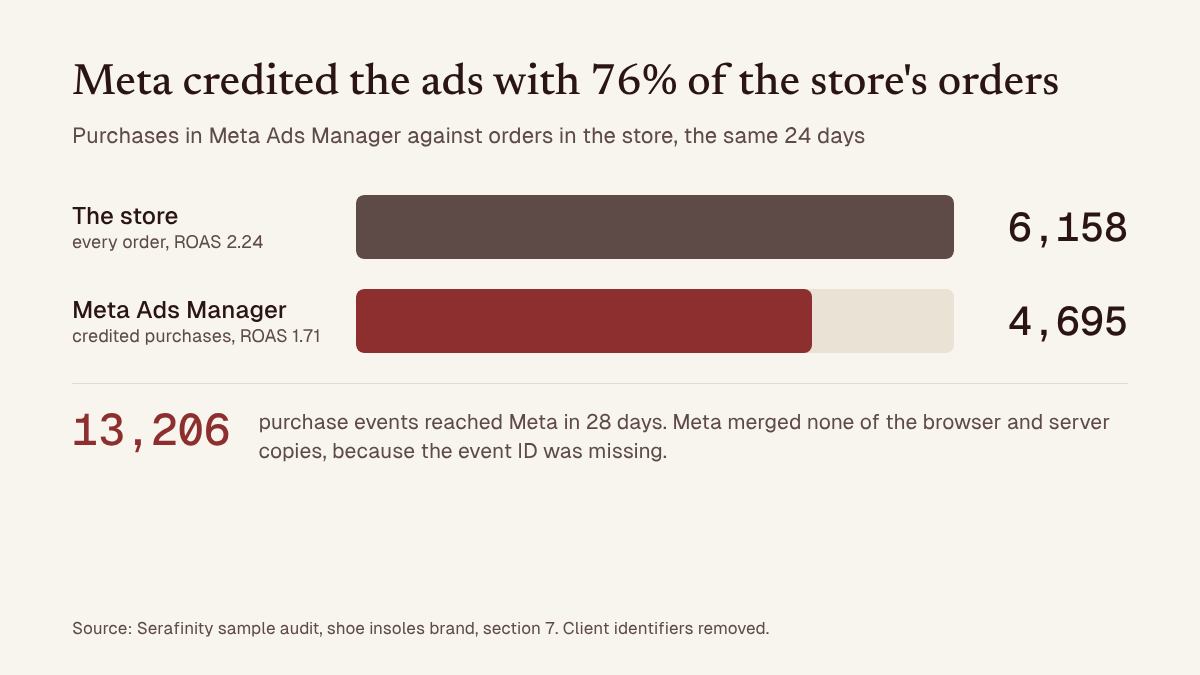
The store's platform sent every order to Meta from its server, so the audit could count the store's orders inside Meta's own event data. It compared them with the purchases Meta credited to the ads on the 24 days where that event data overlapped the review window, 22 September to 15 October 2026:
| Same 24 days | Meta Ads Manager | The store |
|---|---|---|
| Purchases or orders | 4,695 | 6,158 |
| ROAS (sales divided by ad spend) | 1.71 | 2.24 |
| Share of the store's orders counted | 76% | All of them |
Neither column is a typo. They answer different questions. The store counts every order, whoever sent the buyer. Ads Manager counts the purchases Meta can connect to an ad, inside the attribution window each ad set uses: the number of days after an ad interaction in which Meta will credit a sale. In this account, Meta's count also had a tracking fault behind it, covered below.
Some gap is expected. The trouble starts when nobody knows its size, because break-even, how far to raise the budget and every decision to spend more rest on it.
Why does Meta report fewer purchases than Shopify?
Meta reports fewer purchases because it only counts the ones it can tie to an ad, and three things break that tie.
- The buyer never came through a Meta ad. Some buyers never saw or clicked a Meta ad: they found the store through search, email, word of mouth or a friend's link. Shopify counts those orders. Meta does not.
- The ad interaction fell outside the attribution window. For campaigns that optimise for website sales, Meta by default credits a purchase within 7 days of a click on the ad's link. A view, or an engagement such as a like, a share or a watched video, earns 1 day. A buyer who clicked on day one and bought on day ten counts in Shopify only.
- The click ID got lost on the way. Meta's click ID is a code added to the landing page address when someone clicks an ad. Buyers who never clicked an ad have none anyway. When a click's ID is lost before checkout, Meta has to match the purchase on details such as email and phone, and some sales are never tied to the ad that won them. In the audit, the click ID was on 61% of purchase events, against the audit's target of 75%.
Meta narrowed what counts as a click in March 2026: likes, comments and shares moved to a separate engage-through window (Jon Loomer's breakdown of the 2026 attribution settings; Search Engine Land's report on the change). Older guides still describe the wider definition.
Why can the same order reach Meta twice?
Many stores send each order to Meta twice, once from the shopper's browser and once from the store's server. Meta's recommended way to merge the two copies is a shared event ID.
The browser copy comes through the Meta pixel and the server copy through the Conversions API. Meta merges them when they carry the same event name and the same event ID and arrive within 48 hours of each other (Meta's guide to duplicate pixel and server events). The same guide describes a second method that matches the browser ID or your own customer ID instead.
In the audited account, the dataset received 13,206 purchase events in 28 days: 6,347 from the browser only and 6,859 from the server only. Meta matched none of the browser and server copies, because the event ID was missing. Without that shared ID, Meta can count some orders twice and miss the ad click on others.
Shopify's Facebook and Instagram app sends both copies at its Enhanced and Maximum data-sharing levels (Shopify Help Center on data sharing), so your store may already be sending every order twice. The Event Deduplication tab in step 4 below shows whether Meta is merging them.
Can Meta show more purchases than Shopify?
Yes. Over a given set of dates it can, for three reasons.
- Duplicate copies of one order. When deduplication fails, one sale can arrive as two purchase events. Rule this out first, because it adds purchases with no extra sale behind them.
- Meta dates a purchase by the ad, not the order. Ads Manager reports a conversion on the day of the ad impression, not the day of the purchase (Jon Loomer on which ad gets credit). Over a short range of dates, purchases made later can land inside it, so a week can show more purchases in Ads Manager than orders in the store.
- Two ad accounts or datasets claiming the same order. Each ad account counts the purchases it can tie to its own ads, so two accounts, or two datasets receiving the same order, can both count one sale.
View-through and engage-through credit work differently. They raise the share of orders Meta claims, and can make Meta claim more than the store's own channel report gives to Facebook and Instagram, but they cannot by themselves turn one order into two.
If Meta shows more purchases than the store took over the same dates, start with the Event Deduplication tab. A count that runs above the store's is a tracking question before it is a performance result.
Which number should you trust when you judge profit?
Trust neither number alone. Work out break-even both ways and see whether the account makes money in each case.
In the audited account, an average order of $44.25 left $24.19 after product, packing, postage, card fees and refunds: 55% of its value. That put break-even at a store ROAS of 1.83. If every store order is counted as won by the ads, each purchase Meta reported stood for 1.31 store orders, and break-even in Ads Manager was a ROAS of 1.39, or $31.73 a purchase.
| If the orders Meta did not credit | Break-even ROAS in Ads Manager | Six months, after ads and before overheads |
|---|---|---|
| all began with an ad | 1.39 | $171,369 left |
| had no ad behind them at all | 1.83 | $47,445 lost |
Both figures apply the 24-day ratio to the whole six months. The audit says so itself: the 76% rests on 24 days, which is why its plan asks for the store's orders by channel and checks the ratio every week.
The account ran at 1.71, between the two break-even points. So the verdict on six months of spending depended on a question nobody had checked: how many of the uncredited orders started with an ad. That is why the second of the audit's five key changes was to count every order once and compare Meta's count with the store's every week.
How do you check the gap on your own account in 10 minutes?
You need two exports, one division, two checks in Events Manager and one in Ads Manager.
- Pick 28 complete days that ended at least 7 days ago, so late purchases have arrived, and export the store's orders for those dates.
- In Ads Manager, at account level, show Purchases for the same dates, in the same time zone as the store.
- Divide Meta's purchases by the store's orders for the whole period. That is your credit rate; in the audited account it was 76%. Skip daily ratios: Ads Manager dates a purchase by the day of the ad, not the order.
- In Events Manager, open the Purchase event, click Event Details and go to the Event Deduplication tab. Meta shows the share of events deduplicated from each source and warns when that share is too low (Meta's guide to verifying your setup).
- On the same event, read the event match quality score (how well Meta can match events to people, out of 10) and how often the click ID (fbc) is sent. Meta recommends 6.0 or higher for match quality.
- In Ads Manager, open Columns, choose Compare attribution settings and tick 7-day click. If ad sets use different attribution settings, compare them on that column only (Jon Loomer's guide to comparing attribution settings).
Repeat the check every week. A steady rate is something you can plan around. A rate that jumps means the tracking changed, and ROAS from either side of the jump cannot be compared.
How do you fix a mismatch between Meta and Shopify?
Fix the count first, then the credit.
- Send one event ID with both copies. The browser and server copy of every purchase need the same event ID, so Meta can merge them.
- Keep the click ID. Capture it when the visitor lands, keep it with the cart and send it with the server purchase event. Meta says sharing the click ID can help attribute more conversions (Meta's click ID documentation). The audit's target was 75%, up from 61%.
- Use one attribution setting. In the audit, ad sets holding 44.2% of spend also counted engaged-view purchases, a sale within a day of watching a video ad without clicking, which is part of what Meta now calls engage-through. The rest counted 7-day click and 1-day view only. The first group reported a ROAS of 1.69 and the second 1.73, but the two figures could not be compared. Build every new ad set on the same setting.
- Reconcile every week. Put the store's orders next to Meta's purchases and recalculate break-even when the ratio moves.
None of this changes how many orders the store takes. It changes how many the ads get credit for. That matters beyond reporting, because automatic bidding spends towards whatever the Purchase event tells it.
What else do people ask about Meta and Shopify numbers?
Three more questions, answered briefly.
Is a 76% credit rate good?
One account is one data point, so there is no benchmark here we would stand behind. What matters more is knowing your own rate and watching it hold from week to week. In the same audit, the 76% rested on 24 days, so the plan measures it again every week before relying on it.
Should I use Shopify's numbers or Meta's?
Use both, for different jobs. Judge profit from the store's orders and money, with break-even worked out both ways, as above. Compare campaigns, ads and creatives with each other on Meta's numbers, all on one attribution setting.
Does the Conversions API fix the mismatch?
It closes part of it. Server events reach Meta even when the browser copy is blocked, and Meta can match them on details such as email and phone. They work best with the browser copy's event ID, so Meta can merge the two, and with the click ID, so Meta can tie the sale to the ad. In the audit, the store sent every order from its server and Meta credited the ads with 76% of them: orders with no ad behind them stay uncredited whatever the tracking.
About this data
The figures come from a Serafinity sample audit of an online shoe insoles brand: $749,655 of Meta spend from 16 April to 15 October 2026, published with client identifiers removed. The store's orders are the orders its platform reported to Meta from its server. Every figure was computed in code from saved queries, and the window's spend reconciles across six independent cuts of the data.
You can read the full insoles sample audit (PDF), sections 7 and 8, or see what an audit of your own account costs. Serafinity audits accounts and does not run them, so nothing here is a pitch for management.
Sources
- Serafinity, Meta Advertising Audit and 90-Day Scale Plan, shoe insoles sample, pages 2, 7, 13, 14, 29 and 31.
- Meta for Developers, Handling Duplicate Pixel and Conversions API Events.
- Meta for Developers, ClickID and the fbp and fbc Parameters.
- Meta for Developers, Verifying Your Setup.
- Jon Loomer, Meta Ads Attribution in 2026, 10 March 2026.
- Jon Loomer, Which Ad Gets Credit for a Conversion?
- Jon Loomer, 4 Ways to Get Better Reporting with Compare Attribution Settings.
- Search Engine Land, Meta introduces click and engage-through attribution updates.
- Shopify Help Center, Facebook data sharing.
More answers
Inside the Account, No. 1: Why did my giveaway lower my account ROAS?
A giveaway took account ROAS from 4.64 to 3.55: small orders, buyers moved from other campaigns, and $5,193 spent at 1.45 after the bonus ended.
Why did my ROAS drop when I increased my Meta ads budget?
In one audit, spend over $5,000 a day returned 1.26, then 1.02, against a 1.39 break-even. Why ROAS drops as you increase a Meta budget: diminishing returns.