Account setup
Do you need to warm up a new Facebook ad account before running ads?
No, you do not need to warm up a new Facebook ad account (Meta now calls it a Meta ad account) before running ads. Meta does set a daily spending limit on most new accounts, and it says the limit rises as you spend up to or near it.
What does "warming up" a Facebook ad account mean?
It is advice to go slowly with a new ad account before you run the ads you actually want. People who give it mean one of two things, and often mix them.
- Warming up the account. Spend a few dollars a day for one to four weeks, so Meta "trusts" the account and does not restrict it.
- Warming up the pixel. Run a traffic or engagement campaign first, so Meta "has data", and only then switch to sales or leads.
A pixel is the code on your website that tells Meta what visitors did, such as viewing a product or buying. Much of this advice comes from advertisers who run many accounts and expect to lose some. A store with one account and products that follow Meta's policies is in a different position. That last point is our reading, not Meta's statement.
Is there a real limit on a new Facebook ad account?
Yes. Most new advertisers start with a daily spending limit, a cap on what the account can spend in a day, and Meta sets it. Meta's help center:
"Your daily spending limit is the maximum amount you're able to spend on ads each day. Meta sets this limit for most advertisers based on their advertising and payment history. This limit protects advertiser accounts and ensures platform safety. When you reach your limit, your ads pause and resume the next day when the limit resets."
So if a new account stops spending in the afternoon, it is not broken or punished. It has hit the cap, and it starts again at midnight in the ad account's time zone.
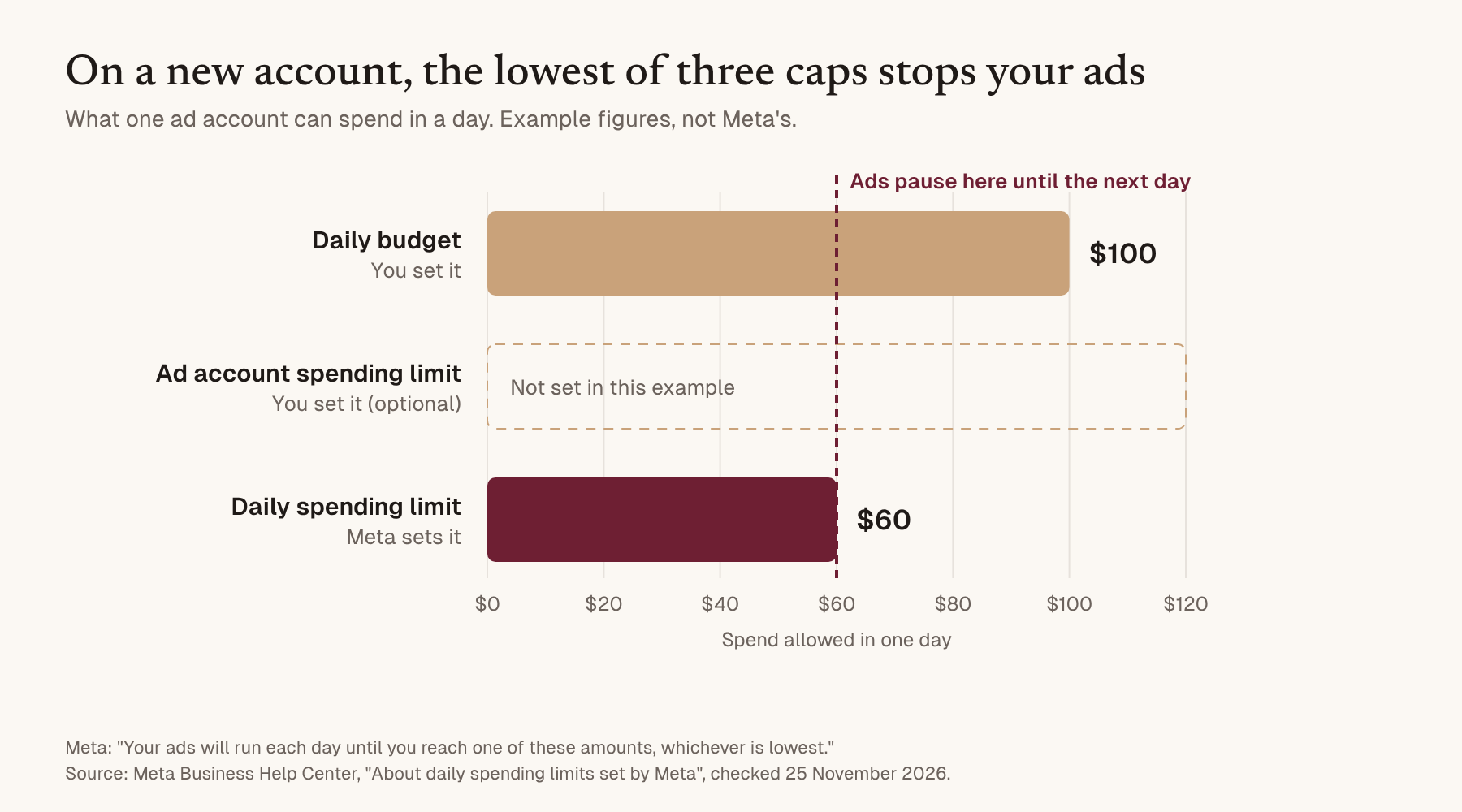
Three caps can stop your ads on a given day:
| Cap | Who sets it | Meta's definition |
|---|---|---|
| Daily spending limit | Meta | "The maximum amount Meta allows your ad account to spend per day." |
| Ad account spending limit | You | "The maximum amount you want to spend across all campaigns in your ad account." |
| Daily budget | You | "The average amount you want to spend on an ad set or campaign each day." |
Meta adds: "Your ads will run each day until you reach one of these amounts, whichever is lowest."
To see your own limit, Meta says: "go to the Current balance section in Payment settings." Meta publishes no standard starting amount, so the dollar figures quoted online are other advertisers' experience. Accounts on monthly invoicing have no daily spending limit.
How does the daily spending limit go up?
By advertising normally and paying for it. Meta's wording:
"Most advertisers have an initial daily spending limit set by Meta. This limit typically increases automatically as you: Build your advertising history. Follow our advertising policies. Spend up to or near your limits."
The third item settles most of the warm-up question. The usual advice is to spend far less than you are allowed, for weeks. Meta says the limit grows as you spend up to or near it. On Meta's own description, holding back does not raise the limit faster.
Meta describes two ways to ask for a faster increase, if the account is eligible:
- Verify your payment method. An eligible account shows "You've qualified for a higher ads daily spending limit" in Payment settings. You confirm a code from your bank, or a temporary $1.00 hold.
- Verify your business. Meta: "After you submit your business verification, you'll receive a decision in as little as 10 minutes and as long as 14 business days."
Does spending slowly protect a new account from being restricted?
Meta's documentation does not say so, and we have no data that shows it. Here is what Meta says can lower a daily spending limit:
"Meta may readjust your daily spending limit if: You have a new business portfolio, ad account, Page or app. You violated Meta's Advertising Standards or other terms and policies. You have ads or accounts with issues like low ad quality rankings or low feedback scores on your Page or app."
Being new is on the list, and you cannot change that. The other two are about what you advertise and how people react to it. The speed at which you spend is not mentioned.
The next part is our reasoning. The daily spending limit already caps a new account, so you cannot spend "too fast" in the way the warm-up advice fears. Meta has set the ceiling for you. One honest limit: Meta does not publish how its review systems decide to restrict an account, so nobody outside Meta can prove a slow start never helps.
Which part is new: the account, the Page, the pixel or the business?
Warm-up advice treats them as one thing. Meta's page names them separately, and the pixel is not on its list.
| What is new | What Meta's page says | What to do |
|---|---|---|
| Ad account | A reason Meta "may readjust your daily spending limit" | Check the limit, then spend near it |
| Business portfolio | Same reason; verifying the business can raise the limit | Verify the business if eligible |
| Facebook Page | Same reason; "low feedback scores" can also lower the limit | Run ads people do not hide or report |
| Pixel | Not mentioned on the spending limit page | Nothing to warm up; see the next section |
Do you need to warm up the pixel with traffic or engagement campaigns first?
No. A campaign optimized for clicks or likes finds people who click or like. It does not get your sales campaign through its learning phase, the period after you create or significantly edit an ad set while Meta works out who to show it to. Meta:
"While the delivery system never stops learning about the best way to deliver an ad set, ad sets exit the learning phase as soon as they can deliver stably. This usually occurs after about 50 results in the week after the ad set's last significant edit."
Two details decide the question. The count is of results, meaning the action that ad set is optimized for. And it is counted per ad set. A week of link clicks in another campaign is not 50 purchases in your sales ad set.
Meta also warns against the small budgets that warm-up plans rely on: "If you set a small or inflated budget, the delivery system has an inaccurate indicator of the people for whom the delivery system should optimize." And it says learning is a cost you accept: "you shouldn't try to avoid the learning phase completely." During it, "ad sets are less stable and usually have a higher CPA", meaning a higher cost per sale or lead.
Two limits. Meta's page does not say whether events from an earlier campaign help a later one, and we cannot measure that from outside. And an ad set that cannot reach about 50 purchases a week may do better optimized for an earlier step, which we cover in What does Learning limited mean on Meta ads?
What does a two-week warm-up cost you?
Money and time, with the learning phase still ahead of you. Take a common plan: $10 a day on a traffic campaign for 14 days. That is $140 and two weeks, as an example, not a measured figure. On day 15 the sales ad set is created, and by Meta's description it starts learning then. Spending below the limit for those two weeks also works against the third item on Meta's list, "spend up to or near your limits".
What should you do in the first two weeks of a new ad account?
Skip the warm-up and do these six things.
- Find your daily spending limit. Open Payment settings and look in the Current balance section.
- Verify what Meta lets you verify. The payment method if Payment settings offers it, and the business if your business portfolio is eligible.
- Start with the campaign you actually want. Sales if you want sales, leads if you want leads.
- Set a budget at or near the limit, if you can afford it. Never spend more than the business can afford in order to raise a cap.
- Keep payments and policies clean. Use a card that will not decline, and read the advertising policies before your first ad.
- Leave the ad set alone for its first week. Meta: "By editing an ad, ad set or campaign during the learning phase, you reset learning and delay our delivery system's ability to optimize."
Expect the first week to cost more per sale than later weeks. That would happen after a warm-up too.
Questions owners ask next
How long should you warm up a Facebook ad account?
You do not need a set warm-up period. Meta publishes no waiting time for new ad accounts. It publishes a daily spending limit, which rises as you advertise within the policies, pay on time and spend up to or near the limit.
How long does it take for the daily spending limit to increase?
Meta gives no timetable. It says the limit "typically increases automatically over time". The only durations on its page are the business verification decision, 10 minutes to 14 business days, and one case where Meta has adjusted your limit: "you might qualify to verify your payment method after 30 days."
Should I buy or rent an ad account that is already warmed up?
We would not. You would be advertising from an account whose history you cannot see and do not control, and if it is closed, your campaigns and data go with it.
Do I need Page followers before I run ads?
Meta's page on daily spending limits does not ask for followers. It mentions a Page twice: a new Page is one reason Meta may adjust the limit, and "low feedback scores on your Page" is another.
About this post's evidence
Most posts on this blog rest on a published Serafinity sample audit. None of our sample audits covers a brand-new ad account, so this post rests on Meta's own documentation. Every sentence in quotation marks is copied word for word from the Meta Business Help Center pages below, as they read on 25 November 2026. Where we reason beyond Meta's text, the post says so. We did not run a test that compares warmed and unwarmed accounts. The sample audits are on the homepage. Serafinity audits accounts and does not run them.
Sources
- Meta, "About daily spending limits set by Meta," Meta Business Help Center, checked 25 November 2026. https://www.facebook.com/business/help/563129151097553
- Meta, "How to increase your Meta daily spending limit," Meta Business Help Center, checked 25 November 2026. https://www.facebook.com/business/help/468638042183410
- Meta, "About the learning phase for ad sets in Meta Ads Manager," Meta Business Help Center, checked 25 November 2026. https://www.facebook.com/business/help/112167992830700
Want this checked on your own account?
Serafinity audits Meta ad accounts read-only and never runs them. Your audit arrives in 2 to 5 working days, or in 24 hours if you need it sooner. See audit pricing.