Measurement
Is Meta taking credit for sales from people who never clicked your ad?
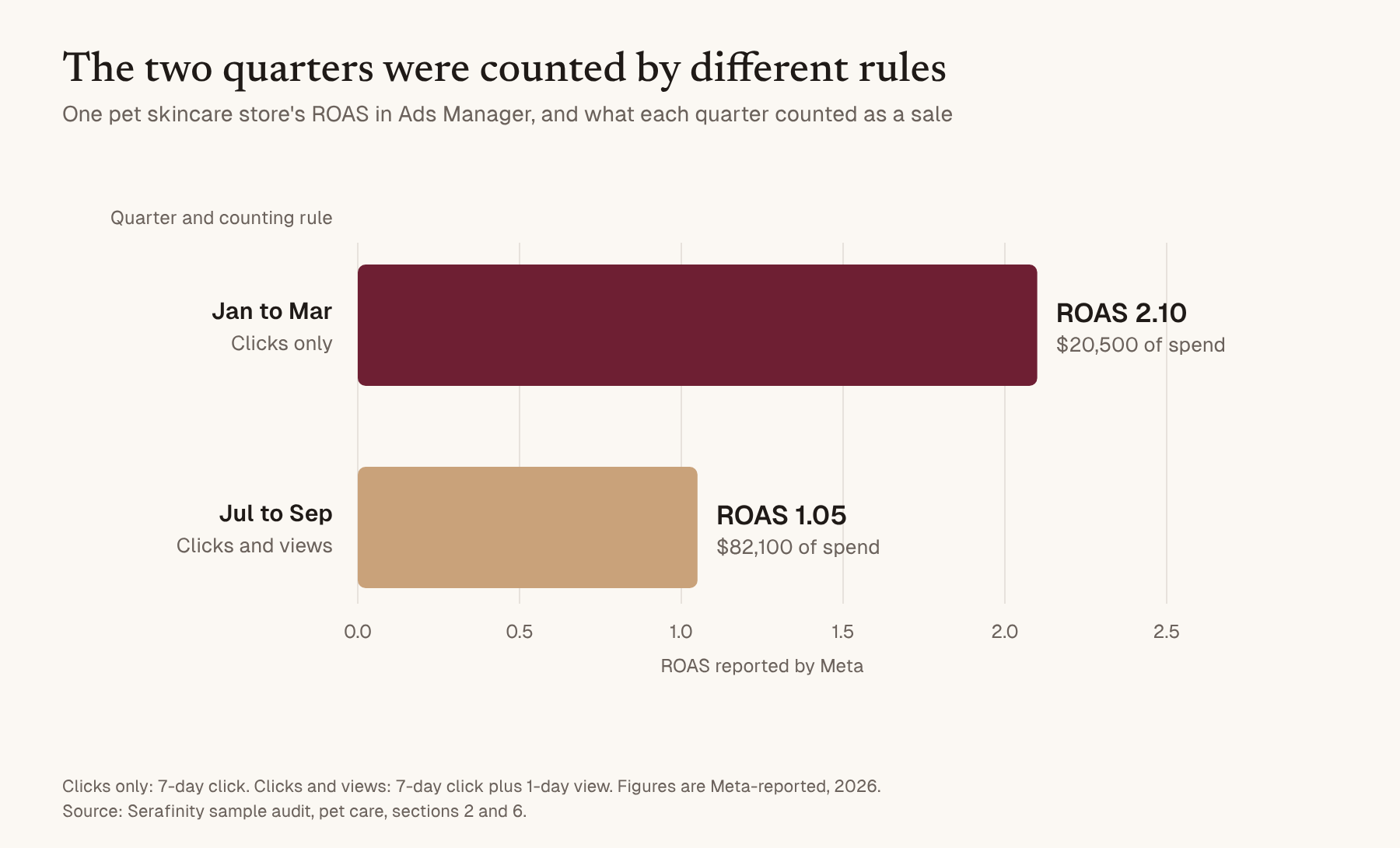
Yes, if your ad sets count views. View-through attribution credits your ad with a sale when someone saw it, did not click, and bought within a day. In one audited store, a ROAS of 2.10 was earned on clicks only and a later 1.05 included views, so the two numbers were never comparable.
What does Meta count as a sale from someone who never clicked?
Meta counts it when the person saw your ad and bought within a day. This is called view-through attribution: the rule that gives an ad credit for a sale after an impression, with no click.
Attribution is how Meta decides which sales your ads get credit for. Each ad set has an attribution setting, and Meta's help center lists three kinds for website sales:
| Kind | What Meta says it counts |
|---|---|
| Click-through | "Counts events that occurred within 1-day or 7-day after a link click on your ad." |
| View-through | "Counts events that occurred within 1-day after an impression of your ad." |
| Engage-through | "Counts events that occurred within 1-day after a non-link click action on your ad." |
An impression is one showing of your ad on someone's screen. So under view-through, a person can scroll past your ad on Monday morning, buy on Monday evening after a friend's recommendation, and Meta counts that sale for the ad.
What does each attribution window mean?
An attribution window is a time limit. It answers one thing: how long after someone touched your ad does a sale still count for that ad?
Picture a candle shop that runs ads, and a shopper called Tom.
| Window | Plain meaning | Tom's example |
|---|---|---|
| 1-day click | Tom clicked the ad's link and bought within a day | Clicks on Monday, buys Monday night. Counted. |
| 7-day click | Tom clicked the ad's link and bought within a week | Clicks on Monday, thinks about it, buys on Saturday. Counted. |
| 1-day view | Tom saw the ad, did not click, and bought within a day | Scrolls past the ad at breakfast, buys that evening. Counted. |
| 1-day engage-through | Tom did something with the ad other than clicking the link, and bought within a day | Watches five seconds of the video, buys later that day. Counted. |
| 28-day click | Tom clicked the ad's link and bought within four weeks | Clicks on the 1st, buys on the 20th. Shown in reports only. |
The first four can be part of an ad set's setting. Meta's reporting also lets you compare "1-day view, 1-day click, 7-day click and 28-day click" side by side.
The click windows are the easiest to trust. Tom chose to click, went to the shop and bought. The only doubt is how long you keep giving the ad credit.
Engage-through is weaker. Meta's wording: "Engage-through actions include any clicks on your ad, excluding link clicks. For video ads, it also includes when a video is played for 5 seconds, or for 97% of the video if the video length is less than 5 seconds." So a click anywhere on the ad other than the link, or five seconds of video, can be enough. Older reports call this engaged-view, and Meta adds that "some accounts may still use prior versions of click-through and engage-through attribution while this feature is rolling out".
The view window asks the least of Tom. The ad only had to appear on his screen.
How can counting views inflate your numbers?
A view proves the ad was on the screen. It does not prove the ad caused the sale. That gap is where the extra sales come from.
Think of a poster on the wall outside a bakery. If the baker counted everyone who walked past the poster and bought bread that day, the poster would look like the best salesperson in town. Most of those people were coming for bread anyway.
Three ways this happens with ads:
- The buyer was already yours. Past customers and people on your email list see your ads often, and they buy often. Each of those sales can land within a day of a view. In the pet skincare account, no campaign excluded existing customers for most of the year, so in the audit's words "every ROAS figure for the year counts repeat customers alongside new ones".
- Something else made the sale. Tom gets your email at noon, searches your shop's name and buys. Your ad also appeared in his feed that morning. Meta counts the sale for the ad, and your email tool counts it for the email.
- You show a lot of ads to the same people. The more often an ad appears in front of someone, the more likely any purchase they make falls within a day of a view. Retargeting, which shows ads to people who already visited your shop, is where this adds up fastest.
A view can still be real. Some people see an ad, remember the shop and come back on their own without clicking. The trouble is that Ads Manager shows both kinds of view sale as one number.
What did the counting rule do in two real accounts?
In one account it hid how far results had fallen. In the other it made almost no difference. Both come from published, anonymised audits.
| Pet skincare store | Insoles store | |
|---|---|---|
| Spend reviewed | About $145,000 over nine months | $749,655 over six months |
| Rules in use | Clicks only, then clicks plus views, then clicks only again | 55.8% of spend on 7-day click and 1-day view; 44.2% also counting engaged views |
| ROAS under the narrower rule | 1.82 (first campaign structure) | 1.73 |
| ROAS under the wider rule | 1.09 (its replacement) | 1.69 |
| What the audit concluded | "The real decline is larger than the reported one." | Add the 7-day click column to the weekly report |
In the pet skincare account, the first campaign structure ran on 7-day click with 1-day view removed. It returned a ROAS of 1.82 at $28.16 per purchase. Its replacement ran on 7-day click plus 1-day view. It took $84,400, which was 58% of the year's spend, and returned 1.09 at $44.25 per purchase.
The replacement was allowed to count more sales and still cost 57% more for each one.
The same thing happened quarter by quarter. A ROAS of 2.10 in the first quarter came from $20,500 of spend counted on clicks only. A ROAS of 1.05 in the third quarter came from $82,100 with views included. On the dashboard, ROAS halved. Counted the same way, the drop would have been bigger.
Does counting views always inflate your results?
No. In the insoles store, the ad sets with the wider rule did not report a better ROAS than the rest.
That account had 108 ad sets, carrying 44.2% of spend, that also counted engaged-view purchases. The other 55.8% counted 7-day click and 1-day view only. The first group reported a ROAS of 1.69 and the second 1.73.
Meta was also not over-counting that store overall. On 24 days where the audit could compare both sides, Meta credited the ads with 4,695 purchases against 6,158 orders in the store. That is 76%. Ads Manager showed a ROAS of 1.71 for those days, and counting every store order gave 2.24.
So "Meta always inflates" is too simple. A store with weak tracking can be under-counted and still have view credit mixed into the number. What you need to know is how much of your own count comes from a view alone.
Why do mixed settings matter more than the setting itself?
Because a number is only useful next to another number counted the same way. Mixed settings break that.
The pet skincare audit put it this way: "the numbers used to judge the account this year were measured three different ways". Its account-level ROAS for each month was "a blend of whichever windows were live".
Two more things in that account made views count for more than usual:
- Click ID coverage was 44.4%. The click ID is the tag Meta adds when someone clicks an ad, and it is how a sale gets tied back to that click. Without it, the audit says, Meta leans on identity matching, "which is more generous to view-through and to existing customers".
- Purchases were 142% of checkouts. Meta recorded more purchases than checkouts started, which is not possible in a real store. By late summer it was 1.9 purchases for every checkout recorded.
If one campaign counts views and another does not, the one that counts views will tend to look better. Budget then moves toward the campaign with the more generous rule, not the one that sells more.
How do you check how many of your sales came from a view alone?
Add the comparison columns in Meta Ads Reporting. Meta says you can compare settings "regardless of the ones you chose to optimize for in your campaign", so nothing in your ad sets changes.
- Open Meta Ads Reporting.
- Click Customize in the top right of the table.
- In the pivot table section, click Options next to the search bar.
- Choose Select attribution settings.
- Tick 7-day click and 1-day view.
- Choose All conversions, then click Apply.
You now have purchases under each rule side by side. The 1-day view column is the sales Meta credited to an ad that the buyer saw and never clicked.
Then check which rule each ad set uses. Meta sets attribution "at the ad set level", so open each ad set and write its setting down. If the list is not the same for every ad set, your campaign totals are a blend, as they were in both stores above.
Is there an alternative to view-through attribution?
Yes, three. None is perfect, so most stores use two together.
1. Count clicks only. Set the ad set to 7-day click, or leave the setting alone and judge on the 7-day click column. A click-only count misses the people who saw the ad and came back on their own. It also leaves out everyone who was only scrolling past.
2. Meta's incremental attribution. This is a second attribution model. Meta describes it as one "that optimizes ad delivery for incremental conversions" and says "it uses machine learning models that predict whether a conversion is caused by an ad". In plain words, Meta tries to count only the sales that would not have happened without the ad. It is still Meta's own estimate of Meta's own ads. Meta also warns that results "cannot be compared in the Campaign Overview table across ad sets with different attribution models".
3. Your store's own orders. Your store knows how many orders really came in. It does not know which ad caused them, but it cannot be inflated by a counting rule. If Meta's purchases go up and store orders stay flat, the extra purchases were a change in counting.
How should you set up your ad account, and what should you look at?
Use one rule everywhere, judge on clicks, and keep views visible next to them.
Setup:
- Put every ad set on the same attribution setting. The pet skincare audit's first step was to "put every ad set on one agreed attribution setting, 7-day click for example, so every number from this point is comparable".
- Separate new customers from existing ones. Tell Meta who your existing customers are in the account's audience segments, then break results down by segment. View credit on past buyers becomes visible instead of hiding in the total.
- Leave the setting alone once it is chosen. Meta says standard attribution "optimizes delivery for selected time windows and user behaviors". The setting steers who sees your ads as well as how sales are counted, so every change makes before and after harder to compare.
What to look at each week:
| Look at | What it tells you |
|---|---|
| Purchases on 7-day click | The number to judge campaigns on |
| Purchases on 1-day view | How much of the total came from views alone |
| Store orders for the same days | Whether the business moved, or only the count |
| New against existing customers | Whether ads are winning buyers or meeting old ones |
If the view column grows and store orders do not, those view sales were not extra sales.
Should you throw view attribution away completely?
No. Stop judging on it, and keep it in sight.
- Keep the view column in your reports. It costs nothing and shows you when views start carrying the result.
- Take views out of the setting where ads mostly reach people who already know you. Retargeting and existing-customer campaigns are where a view is least likely to be the reason for the sale.
- Be slower to remove it from cold video campaigns. Someone who watched your video and bought the same day without clicking is the case view credit was built for. Check it against store orders before deciding.
Expect the reported ROAS to drop the week you remove views. The pet skincare audit warned its reader the same way: "The number on the dashboard will fall while the business is unchanged." Your store's orders tell you whether anything real changed.
Questions owners ask next
Is view-through the same as engage-through?
No. View-through needs only an impression. Engage-through needs an action on the ad that is not a link click, or five seconds of a video.
Can you see view-through sales without changing your ad sets?
Yes. The comparison in Meta Ads Reporting works on any ad set, whatever it is set to optimize for. The 28-day click column only shows part of the picture until a campaign has run for 28 days.
Does the attribution setting change who sees your ads?
Yes. Meta says standard attribution "optimizes delivery for selected time windows and user behaviors". So an ad set that counts views is also delivered with views in mind, and changing the setting changes more than the report.
About this data
The figures come from two published sample audits by Serafinity: a pet skincare store (about $145,000 of Meta spend over nine months) and an insoles store ($749,655 over six months). Client names, product names and other identifiers were removed before publication. Every figure in this post was checked against the audit text.
Neither audit measured the exact share of purchases that came from a view alone, so this post does not give one. The pet skincare figures are Meta-reported and were not reconciled against store orders. The insoles comparison with store orders covers 24 days. You can read the pet care and insoles sample audits (PDF), or see what an audit of your own account costs. Serafinity audits accounts and does not run them, so nothing here is a pitch for management.
Sources
- Serafinity, Meta Advertising Audit and 90-Day Scale Plan, pet care sample: sections 2, 4, 5, 6, 12 and 17 (the PDF has no page numbers). https://serafinity.com/sample-audit-petcare.pdf
- Serafinity, Meta Advertising Audit and 90-Day Scale Plan, D2C insoles sample: section 1 (page 1) and section 7 (page 13). https://serafinity.com/sample-audit-d2c-insoles.pdf
- Meta, "About attribution models and attribution settings," Meta Business Help Centre, checked 23 November 2026. https://www.facebook.com/business/help/460276478298895
- Meta, "Compare attribution settings in Meta Ads Reporting," Meta Business Help Centre, checked 23 November 2026. https://www.facebook.com/business/help/654970342692714
- Meta, "About incremental attribution," Meta Business Help Centre, checked 23 November 2026. https://www.facebook.com/business/help/2366718460372682
Want this checked on your own account?
Serafinity audits Meta ad accounts read-only and never runs them. Your audit arrives in 2 to 5 working days, or in 24 hours if you need it sooner. See audit pricing.