Campaign setup
What are Meta catalog ads, and how do you get the most out of them?
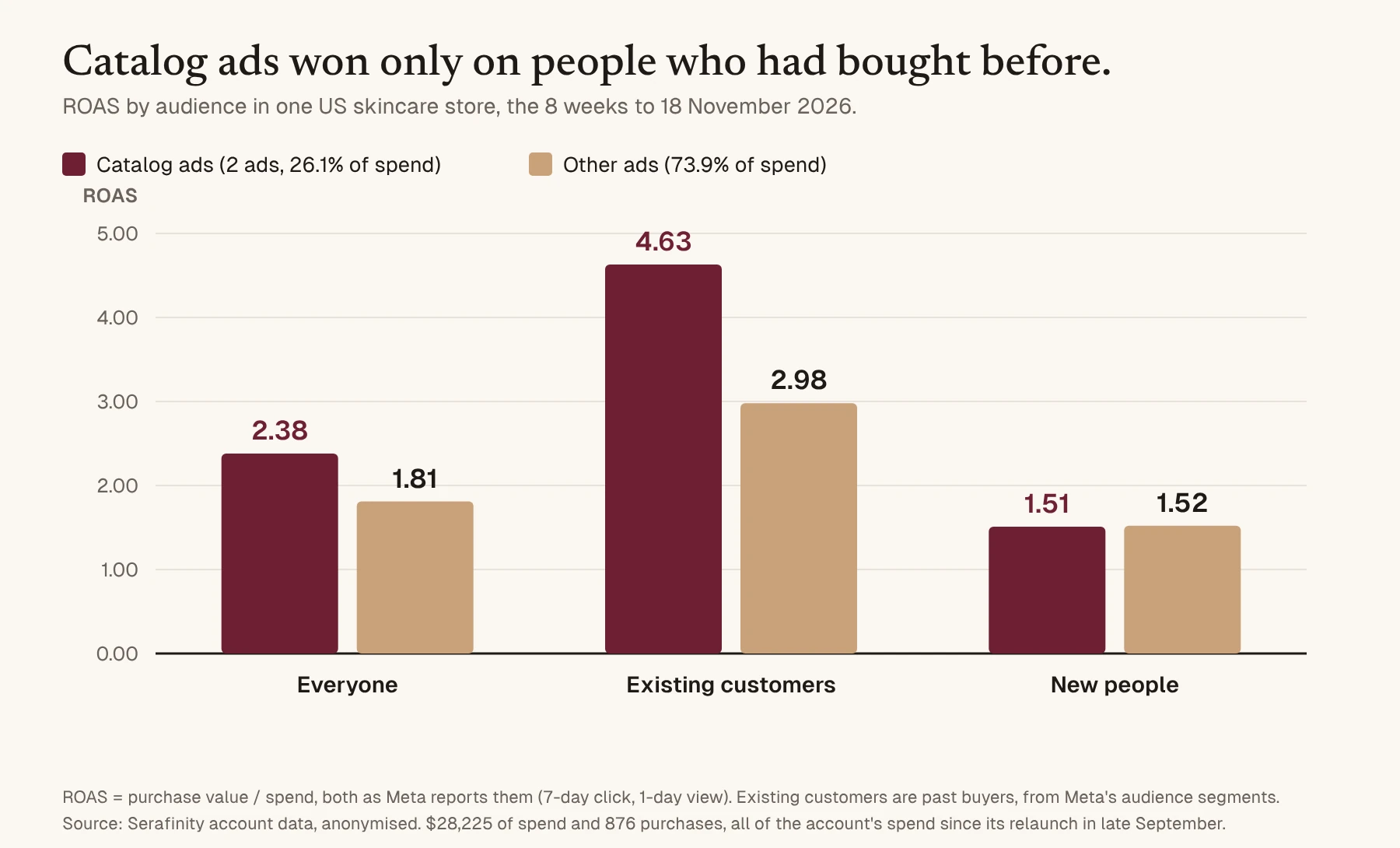
Meta catalog ads pull products from your product catalog and show each person the items they are most likely to buy. You need a catalog, a pixel that reports product IDs, and a sales campaign. In one US skincare store they returned 2.38 against 1.81 for its other ads, but on new customers 1.51 against 1.52.
What are Meta catalog ads?
They are ads that build themselves from your product catalog. Instead of designing one ad per product, you connect a catalog, and Meta picks which products to show each person based on what they viewed, added to cart or bought.
Meta's help pages now call them ads showing product media. Until recently they were Advantage+ catalog ads, and before that most advertisers knew them as dynamic product ads, or DPA. Meta says it picks the products for each person "based on their interests, intent and actions online".
A catalog ad can appear as a carousel, a collection, or a single image or video. Each card pulls the product's image, title and price from the catalog, and a click goes to that product's own page. Carousel ads and catalog ads are often confused: a carousel is a format you build card by card, while a catalog ad is a source of creative that can fill a carousel, a collection or a single ad.
You can use them for four jobs, and each one uses different audiences:
| Job | Who sees the ads | Meta's audience advice |
|---|---|---|
| Retargeting | People who viewed products or added them to cart | Include viewers and adds to cart, exclude buyers |
| Prospecting | People who have never visited or bought | Broad audience, exclude recent buyers |
| Cross-selling | People who bought one product set | Include buyers of set A, show products from set B |
| Upselling | People considering a product | Include viewers of set A, show pricier products from set B, exclude buyers |
What do you need before you can run catalog ads?
A catalog with your products, a pixel or app SDK that reports which products people look at and buy, and a connection between the two.
- A catalog in Commerce Manager. It must sit in a business portfolio. You can add products by hand, with a data feed, with the pixel, or by importing them from a partner platform such as Shopify or WooCommerce, which keeps prices and stock in sync.
- Three pixel events with product IDs. Meta requires ViewContent, AddToCart and Purchase, and each one must carry content_ids (or contents) that match the id field in your catalog.
- The pixel connected to the catalog. This is what lets Meta match "viewed product 1234" on your site to product 1234 in your ads.
| Pixel event | What it records | Required parameter |
|---|---|---|
| ViewContent | Someone viewed a product | content_ids or contents |
| AddToCart | Someone added a product to their cart | content_ids or contents |
| Purchase | Someone bought a product | content_ids or contents |
Then check the catalog match rate in Commerce Manager, under Catalog and then Events. It is the share of product IDs your pixel sends that match products in the catalog. Meta recommends keeping it above 75%, and ideally above 90%. Below that, Meta can't use the events to pick products for each person. If one pixel feeds two catalogs, the match rate splits between them, so Meta recommends keeping all your products in one catalog.
Where do catalog ad images come from? Are they pulled from your website?
Usually, yes. A catalog ad shows the images stored in your catalog, and the catalog gets them from wherever your product data comes from, which for most stores is the store itself. Meta then downloads and keeps its own copy of each image.
Where exactly depends on how products get into the catalog:
| How products get into the catalog | Where the images come from | When they update |
|---|---|---|
| Store sync, such as Shopify or WooCommerce | The product photos in your store's admin | Every few minutes on Shopify |
| Data feed: a spreadsheet, XML file or Google Sheet | The links in the image_link and additional_image_link columns | When a link changes and Meta fetches the new file |
| Meta pixel | Product details tagged in the code of your product pages | Usually within 15 minutes of someone viewing the page |
| Website crawling, for eligible businesses | Meta crawls your product pages | Automatically |
| Manual, in Commerce Manager | Images you upload yourself | When you edit the product |
| Social media | Products Meta's AI finds in your Facebook and Instagram posts | Automatically |
On Shopify, the first, largest photo of each product becomes its main image, and that is the one catalog ads show by default. The other photos become additional images. A product with variants usually syncs one image per variant. To change which photo leads, reorder the photos in Shopify, then make a small edit to the product, such as its description, so the new order syncs.
With a data feed, Meta downloads each image from its link. It only notices a new image when the link changes, so save a replacement under a new link. Meta fetches it the next time the product gets a pixel event or appears in an active campaign.
Videos can come from your website too. Automatic product video updates are on by default. For products with no video, Meta scans your public product pages, the videos in your Meta ads, your Facebook and Instagram posts and other catalogs in your business portfolio. Videos you add yourself take priority. You can switch sources off in Commerce Manager, under Settings and then Catalog.
In the store from S1E3, the catalog syncs 47 products from Shopify. Every image comes from the store's Shopify files, a main photo plus several more per product, and Meta holds its own copy of each. 4 of the 47 products had a video. Neither of its catalog ads used an image template or dynamic overlays, so the cards showed the store's own photos, apart from backgrounds Meta was allowed to generate on the All products ad.
If images go missing, the usual causes are a firewall or protection service blocking Meta (add the meta-externalads user agent to your allow list), password protection, a broken link or one with spaces, a file over 8 MB, or a link to a preview page instead of the image file itself.
How do you set up catalog ads in Ads Manager in 2026?
Meta has changed the setup. The Advantage+ catalog ads switch is gone from new sales campaigns. You now keep product data turned on at the campaign level and choose product media as the creative source in each ad.
- Create a sales campaign. Choose the Sales objective. Catalog ads also run under traffic, engagement, leads and app promotion.
- Keep product data on and select your catalog. It is on by default if you have a catalog. You can pick only one catalog per campaign, at the campaign level.
- Pick the dataset in each ad set. That is the pixel or SDK connected to your catalog. Optimize for purchases.
- Set the audience. Broad for prospecting, a catalog custom audience for retargeting. Exclude recent buyers unless you are cross-selling.
- In the ad, choose product media as the creative source and pick a product set. The product set decides which products can appear in that ad.
- Choose the format and write the text. Carousel, collection, or single image or video. You can insert catalog fields, such as the product name or price, into the text.
- Review the Advantage+ creative options. These include dynamic overlays, image touch-ups and background generation. More on these below.
- Check the destination and tracking, then publish. Clicks on a product go to its own link from the catalog. The website URL you enter is used for the profile card in a carousel.
Campaigns made before the change keep running as they were. A duplicated older campaign moves to the new setup where possible.
Should catalog ads go after new customers or past visitors?
Both can work, but run them as separate ad sets so you can see which one earns the money. Meta's own tips differ for each.
Retargeting. Include a catalog custom audience of people who viewed products or added them to cart, and exclude people who bought recently. Meta suggests splitting the audience by how long ago people visited, because someone who viewed a product yesterday is more likely to buy than someone who viewed it 14 days ago, and suggests 30- or 90-day windows if the audience is small. Our retargeting post shows why a separate retargeting budget often isn't worth it any more.
Prospecting. Use location and demographics such as age, and avoid stacking interests, which limits reach. Meta recommends excluding people who bought in the last 10 days, and advises against excluding all website visitors, because some of them help the ads find the right people. A carousel can open with an intro card about your brand, since new people don't know you yet.
Cross-selling and upselling. These need two product sets: one to build the audience, one to show in the ads. For example, show ski boots to people who bought skis.
Do catalog ads really beat your other ads?
In the store we checked, they looked better, but all of the gap came from past buyers. On new customers they did no better than the store's other ads.
This is the US skincare store from INSIDE THE ACCOUNT S1E3, over the 8 weeks to 18 November 2026. It ran 2 catalog carousels in a campaign named for prospecting, with a broad audience and no purchaser exclusion, next to its video and image ads.
| Catalog ads | Other ads | |
|---|---|---|
| Share of spend | 26.1% | 73.9% |
| ROAS, everyone | 2.38 | 1.81 |
| ROAS, existing customers | 4.63 | 2.98 |
| ROAS, new people | 1.51 | 1.52 |
| Cost per purchase, new people | $43.53 | $38.88 |
| Purchases from existing customers | 53.4% | 29.8% |
| Spend on existing customers | 27.8% | 19.7% |
The catalog ads spent 27.8% of their budget on people who had bought before, and that slice brought in 53.4% of their purchases. Those buyers cost $14.62 each. New buyers cost $43.53. The catalog ads ended up with 43.3% of all the purchases the account's ads got from existing customers, on 26.1% of its spend.
That is what catalog ads do: they show people the products they already looked at or bought, and people who already know a store buy more easily. The sales are real, but some of those customers might have come back anyway, and Meta's standard reporting can't tell you which. So the blended 2.38 overstates what the catalog ads add. On new people, they returned 1.51, the same as everything else.
The other ads aren't free of this either. Their 1.81 also leans on existing customers, at 29.8% of their purchases. Catalog ads just lean harder.
Why do catalog ads take so much of the budget?
Because the purchases they report look cheap. In this store, a catalog ad purchase cost $28.08 against $33.99 for the other ads, and most of that gap came from past buyers.
When ads share a campaign budget, Meta moves money in real time to the ad sets it sees as the best opportunities. Ads that report cheap purchases from past buyers look like the best opportunity, whether or not those buyers needed an ad. This store kept its catalog ads in their own campaign with a fixed daily budget of $200, so they couldn't grow past it.
Inside their own ad set, though, the same thing happened between the two catalog ads:
| Catalog ad | Share of catalog spend | ROAS | ROAS, new people | Purchases per click |
|---|---|---|---|---|
| All products | 78.0% | 2.13 | 1.32 | 5.45% |
| Value bundles | 22.0% | 3.27 | 2.24 | 6.55% |
Meta put most of the money into the ad showing every product. The ad limited to the store's value bundles got a fifth of it and returned more on both new and existing customers. It also had only 72 purchases against 190, so it may not hold at four times the budget, but it was never tested there.
How to keep catalog ads from taking over:
- Give them their own campaign or ad set budget if you want to control how much they spend.
- Set a spending limit on the ad set if they share a campaign budget.
- Cap spend on existing customers yourself. Meta removed the existing customer budget cap from Advantage+ sales campaigns. Its replacement is two ad sets in one campaign: one that includes your customer list with a spending limit, and one that excludes it.
Which product set should you advertise?
Start with Meta's advice, then test it. Meta recommends the "All products" set for the best overall results, because a larger set gives delivery more products to match to each person.
If you curate a set, Meta suggests turning on Add recommended products in Commerce Manager, which adds bestsellers and products with conversions in the last 14 days. When the set holds less than 60% of the catalog, Ads Manager also offers to include other products from the catalog when that is likely to help. Meta recommends leaving it on unless you must show only that set.
The store above is a reason to test rather than assume: its curated bundle set beat All products on new customers, 2.24 against 1.32. Run the two as separate ads or ad sets, give each enough budget to collect purchases, and compare them on new people.
Don't edit a product set or a product video template while the campaign is live. Meta warns that performance may suffer while it updates the audience.
How do you make catalog ads look and sell better?
Fix the catalog first, then the creative. Catalog ads can only be as good as the titles, images and prices in your feed.
Product data.
- Titles up to 200 characters, but under 65 so they don't get cut off. Describe the product only, with no "sale", "free shipping" or "bestseller".
- Descriptions of 30 to 9,999 characters, longer than the title, in plain text, without links or contact details.
- Keep prices and stock matching your site. If a product shows the wrong price, the ad does too.
Images.
- At least one image per product, and 4 or more if you run carousels with the slideshow option.
- The main image shows the whole product, on a white backdrop, with no text, promo codes or watermarks over it.
- Use one aspect ratio, 1:1 or 4:5, across the catalog, or carousels may adjust the images to match.
- When you replace an image through a data feed, give it a new URL, or Meta won't pick up the change.
Video. New catalog ads now show product videos automatically when a product has one and Meta expects it to do better, and the image otherwise. Upload 9:16 for Stories and Reels and 4:5 or 1:1 for Feed, or let Commerce Manager build videos from a template. Remove promotion videos when the promotion ends.
Frames and templates. A plain photo on white is what most catalog ads show. The next section shows how to put your own frame around it.
How do you add a custom frame to Meta catalog ads?
Build an image template in Commerce Manager, then choose it in the ad. A template is a frame Meta applies to every product the ad shows: your background colour, your logo, the live price from the catalog, stickers and short text, with the product cut out of its original background. Meta's older frame tool still works, but it is being retired.
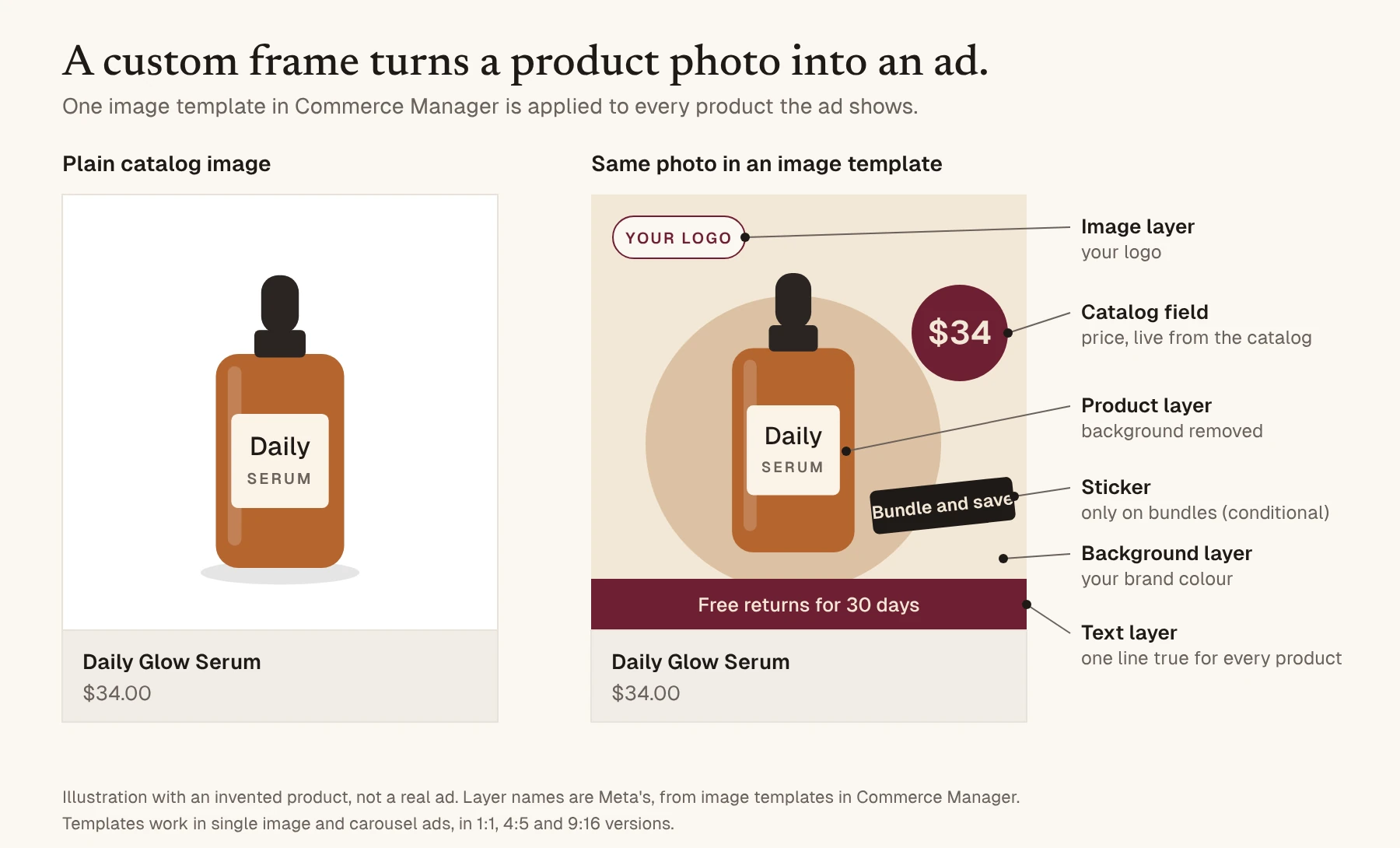
Build the template in Commerce Manager:
- Open image templates. In Commerce Manager, select your catalog, click Image templates on the left, then + Create.
- Pick a starting point. A blank canvas or one of Meta's starter templates. Name it.
- Add the layers. The design starts at 1:1. The table below lists the six layer types.
- Set conditions. Conditional display shows a layer only when a product attribute, such as its price, meets a rule you set. It works on catalog field, image and text layers.
- Preview it on real products. Pick product sets and products from the dropdowns under the preview, and check the longest titles and the oddest shapes.
- Make 4:5 and 9:16 versions. Copy the 1:1 design across and adjust it. Meta says templates in all three ratios reach the most placements. In the 9:16 version, keep text and logos away from the top, bottom and sides, where Stories and Reels put the profile icon and buttons.
- Save. Save as you go, too.
| Layer | What it does | How we'd use it |
|---|---|---|
| Product (required) | The product photo from the catalog. Image 0 is the main one, 1 to 3 the extra ones. Background removal and crop to fit are optional | Background removal on, so the product sits on your design instead of a white box |
| Background | One colour behind everything | A brand colour instead of white |
| Image | Your own JPG or PNG | Your logo, small, in a corner |
| Catalog field | Title, brand, description, price, sale price or a custom label from the catalog | The price, so it changes when your prices change |
| Text | Your own words, with font, size and colour | One short line that is true for every product, such as your returns policy |
| Sticker | A circle, rectangle or square with text | A badge such as Bundle and save, shown only on the products it fits |
To give different products different badges, such as New or Bundle and save, fill a custom label (custom_label_0 to custom_label_4) in your feed or in a supplementary feed, then show that label in a catalog field layer or use it in a condition. A supplementary feed adds fields to products that are already in the catalog, including ones synced from Shopify.
Use the template in Ads Manager:
- In a sales campaign, keep product data on and select your catalog.
- In the ad, choose products from your catalog as the creative source, and pick the product set.
- In Ad creative, under Image template, click Choose template, pick yours and check the preview.
- In Advantage+ creative, turn off background generation so it doesn't replace your template, and turn off dynamic overlays unless you want them on top. Keep image touch-ups on, so the 4:5 and 9:16 versions can reach every placement.
Templates work in single image and carousel ads, not collection ads.
The old frame tool. In the ad's creative section, under Creative tools, click Edit creative, then Add a frame and Custom. Upload a 1:1 image of at least 1080 x 1080 pixels and under 1 MB, ideally a transparent PNG with no text, then set its opacity, size and position. A frame is one fixed image, so it can't show each product's price, and it doesn't appear on Instagram. Meta is replacing frames with image templates and turning them off in early 2027, so start new ads on templates.
Lighter options. Dynamic overlays put the price, a strikethrough price, the percentage off or free shipping on the image as a label, with no template. They only show on Facebook Feed, and free shipping needs a shipping cost of 0.0 in the catalog. Catalog fields in the ad text add the product name or price to the words around the image.
Video gets the same treatment. The product video creator in Commerce Manager builds a video for every product from one template: an optional intro hook, a slideshow of the product's images over a background, and an optional closing card with your logo and call to action, in 9:16 and 4:5. Meta makes videos for up to 25% of the catalog, at most 10,000 products, starting with products that have no video and get the most impressions. It is still being rolled out, so you may not see it yet.
Test the frame. We found no figures from Meta on what templates do to results, and the store above never ran one. Put the template in a second ad next to the plain one in the same ad set, or run a Meta A/B test, and compare cost per purchase on new people.
How do you measure catalog ads properly?
Split their results into new and existing customers, and judge them on the new ones.
- Set up audience segments in your ad account settings so Ads Manager can break results down by new, engaged and existing customers. Then use the audience segments breakdown on the catalog campaign.
- Compare ROAS on new people between catalog ads and your other ads, as in the table above. That is the number that tells you whether they bring in customers you wouldn't otherwise get.
- Check the share of purchases from existing customers. In this store it was 53.4% for catalog ads. If yours is similar and the campaign is meant to find new customers, exclude recent buyers.
- Optimize for purchases. Meta says product recommendations improve when you optimize for lower-funnel events such as purchase rather than views or adds to cart.
- Keep the match rate above 90% and check Commerce Manager for products with issues that stop them showing.
- Check Meta's purchases against your store. Meta's count and your order records often differ: here is why Meta's purchases don't match Shopify.
How do you get the most out of Meta catalog ads?
Get the basics right, give each job its own ad set, keep past buyers out of prospecting, and judge the ads on new customers.
- Get the basics right. One catalog, the three pixel events with matching IDs, and a match rate above 90%.
- Clean the product data. Short, plain titles, whole-product images on white, one aspect ratio, correct prices.
- Separate the jobs. Prospecting, retargeting and cross-selling each in their own ad set, with Meta's include and exclude audiences.
- Keep past buyers out of prospecting. Exclude people who bought in the last 10 days, or cap existing-customer spend with two ad sets.
- Give them their own budget if you don't want them to take over a shared one.
- Start broad with products, then test a curated set against All products.
- Give them a custom frame and video. An image template with your colours, logo and live price, and product videos where you have them.
- Judge them on new customers. Use the audience segments breakdown, not the blended ROAS.
Questions owners ask next
Are catalog ads the same as carousel ads?
No. A carousel is a format you build card by card. A catalog ad pulls its products from your catalog and can appear as a carousel, a collection, or a single image or video. A catalog carousel is a carousel whose cards Meta fills for each person.
Do I need Shopify to run catalog ads?
No. You can add products to a catalog by hand, with a data feed or with the pixel. A store builder such as Shopify or WooCommerce just makes it easier, because it can sync your products to the catalog automatically.
Can catalog ads use different photos from my website?
Yes. A supplementary feed can replace the main and extra image links for products already in your catalog, even when they sync from Shopify, and a template can show extra image 1, 2 or 3 instead of the main one. Meta recommends using the same images as your website, so keep the main photo close to what shoppers see on the product page.
Should I exclude past customers from catalog ads?
From prospecting, yes. Meta recommends excluding people who bought in the last 10 days, and in the store above, existing customers took 27.8% of the catalog spend and gave 53.4% of its purchases. For cross-selling, do the opposite: include past buyers and show them products from a different set.
Can catalog ads bring in leads instead of sales?
Yes. Meta offers catalog ads for lead generation, which collect contact details with an instant form or start a phone call. Meta says they suit car dealers, real estate and travel, where people browse many listings before they get in touch.
About this data
One US skincare store's Meta ad account, the same store as S1E3, over the 8 weeks from its relaunch in late September to 18 November 2026: all of its ad spend in that time, $28,225, with 876 purchases. 2 catalog carousel ads ran in one broad ad set optimized for purchases, with a daily budget of $200, from 24 September. One showed the All products set and one a set of value bundles. Serafinity reviewed the data read-only, pulled from Meta's reporting through its API. The catalog details, its data source, product images and videos, and the two ads' creative settings, were read the same way on 20 November 2026.
ROAS is purchase value divided by spend, both as Meta reports them, on the account's attribution setting of 7-day click and 1-day view. That is Meta's count, not the store's order records. New and existing customers come from Meta's audience segments breakdown, where existing customers are the people the account defines as past buyers. A sliver of spend, $2.04, fell in an unknown segment and is left out of the segment figures. Other ads means every non-catalog ad in the account: videos, images and carousels the store designed itself.
Every figure was computed in code from the raw data, and the segment totals add up to the campaign and account totals. The brand, products and ad names are left out, and the owner agreed to publication. One store over 8 weeks is a worked example, not a benchmark, and two catalog ads prove little about catalog ads in general. Check your own with the steps above.
Sources
- The account data described in About this data: Meta Ads reporting for one US skincare store, pulled read-only.
- Meta, "About ads showing product media," Meta Business Help Centre, checked 19 November 2026. https://www.facebook.com/business/help/397103717129942
- Meta, "Changes to sales campaign setup using a catalog in Meta Ads Manager," Meta Business Help Centre, checked 19 November 2026. https://www.facebook.com/business/help/2441336696279825
- Meta, "Create Meta Advantage+ catalog ads," Meta Business Help Centre, checked 19 November 2026. https://www.facebook.com/business/help/1132465490107046
- Meta, "Requirements to run ads showing product media," Meta Business Help Centre, checked 19 November 2026. https://www.facebook.com/business/help/232493917827200
- Meta, "Required Meta Pixel events and parameters for ads showing product media," Meta Business Help Centre, checked 19 November 2026. https://www.facebook.com/business/help/606577526529702
- Meta, "About catalog match rate," Meta Business Help Centre, checked 19 November 2026. https://www.facebook.com/business/help/1183006658734497
- Meta, "Import and manage items in your catalog from a partner platform," Meta Business Help Centre, checked 19 November 2026. https://www.facebook.com/business/help/365831587397584
- Meta, "How to create a catalog custom audience," Meta Business Help Centre, checked 19 November 2026. https://www.facebook.com/business/help/477390310506055
- Meta, "Tips for retargeting with ads showing product media," Meta Business Help Centre, checked 19 November 2026. https://www.facebook.com/business/help/274706343234703
- Meta, "Tips for reaching a broad audience with ads showing product media," Meta Business Help Centre, checked 19 November 2026. https://www.facebook.com/business/help/338460790267195
- Meta, "Tips for cross-selling or upselling with ads showing product media," Meta Business Help Centre, checked 19 November 2026. https://www.facebook.com/business/help/1604184966521384
- Meta, "About budgets," Meta Business Help Centre, checked 19 November 2026. https://www.facebook.com/business/help/214319341922580
- Meta, "How to replicate existing customer budget cap," Meta Business Help Centre, checked 19 November 2026. https://www.facebook.com/business/help/1142614290190459
- Meta, "Tips for improving product recommendations in ads showing product media," Meta Business Help Centre, checked 19 November 2026. https://www.facebook.com/business/help/120193522268735
- Meta, "Include other products when advertising your product set," Meta Business Help Centre, checked 19 November 2026. https://www.facebook.com/business/help/947391254197807
- Meta, "How to create and edit product sets in your catalog," Meta Business Help Centre, checked 19 November 2026. https://www.facebook.com/business/help/620275848114281
- Meta, "Product title specifications for catalogs," Meta Business Help Centre, checked 19 November 2026. https://www.facebook.com/business/help/2104231189874655
- Meta, "Product description specifications for catalogs," Meta Business Help Centre, checked 19 November 2026. https://www.facebook.com/business/help/2302017289821154
- Meta, "Product image specifications for catalogs," Meta Business Help Centre, checked 19 November 2026. https://www.facebook.com/business/help/686259348512056
- Meta, "About showing product video in your ads," Meta Business Help Centre, checked 19 November 2026. https://www.facebook.com/business/help/1425663274646029
- Meta, "Create image templates for ads using product media," Meta Business Help Centre, checked 19 November 2026. https://www.facebook.com/business/help/947145298422088
- Meta, "Add a frame to product images in ads showing product media," Meta Business Help Centre, checked 19 November 2026. https://www.facebook.com/business/help/517601898571657
- Meta, "Add dynamic overlays in Advantage+ catalog ads," Meta Business Help Centre, checked 19 November 2026. https://www.facebook.com/business/help/626735652348813
- Meta, "About Advantage+ sales campaigns," Meta Business Help Centre, checked 19 November 2026. https://www.facebook.com/business/help/1362234537597370
- Meta, "About Advantage+ catalog ads for lead generation," Meta Business Help Centre, checked 19 November 2026. https://www.facebook.com/business/help/2069037703372194
- Meta, "Ways to add products to your catalog," Meta Business Help Centre, checked 20 November 2026. https://www.facebook.com/business/help/384041892421495
- Meta, "Add products to your catalog from your website with a Meta pixel," Meta Business Help Centre, checked 20 November 2026. https://www.facebook.com/business/help/887775018036966
- Meta, "About managing your catalog with Shopify," Meta Business Help Centre, checked 20 November 2026. https://www.facebook.com/business/help/1046957249463415
- Meta, "How product images from Shopify are synced to your catalog," Meta Business Help Centre, checked 20 November 2026. https://www.facebook.com/business/help/1638980739993011
- Meta, "Troubleshoot product image issues in your catalog in Commerce Manager," Meta Business Help Centre, checked 20 November 2026. https://www.facebook.com/business/help/5203151363141674
- Meta, "How to add product videos to your catalog automatically from your website and other sources," Meta Business Help Centre, checked 20 November 2026. https://www.facebook.com/business/help/376197728597548
- Meta, "Add a supplementary feed to your catalog in Commerce Manager," Meta Business Help Centre, checked 20 November 2026. https://www.facebook.com/business/help/609872007120910
- Meta, "Create product videos with video templates in Commerce Manager," Meta Business Help Centre, checked 20 November 2026. https://www.facebook.com/business/help/1074724715095990
- Meta, "About text overlays and the safe zone for ads on Facebook and Instagram," Meta Business Help Centre, checked 20 November 2026. https://www.facebook.com/business/help/980593475366490
- Meta, "About attribution models and attribution settings," Meta Business Help Centre, checked 19 November 2026. https://www.facebook.com/business/help/460276478298895
Want this checked on your own account?
Serafinity audits Meta ad accounts read-only. Your audit arrives in 2 to 5 working days, or in 24 hours if you need it sooner. See audit pricing.